
AI assistant
Describe it, review it, apply it
Describe a form or upload a paper one, and AI drafts it. Ask for changes to forms and workflows in plain language. Nothing changes until you apply it.
Improve with AI
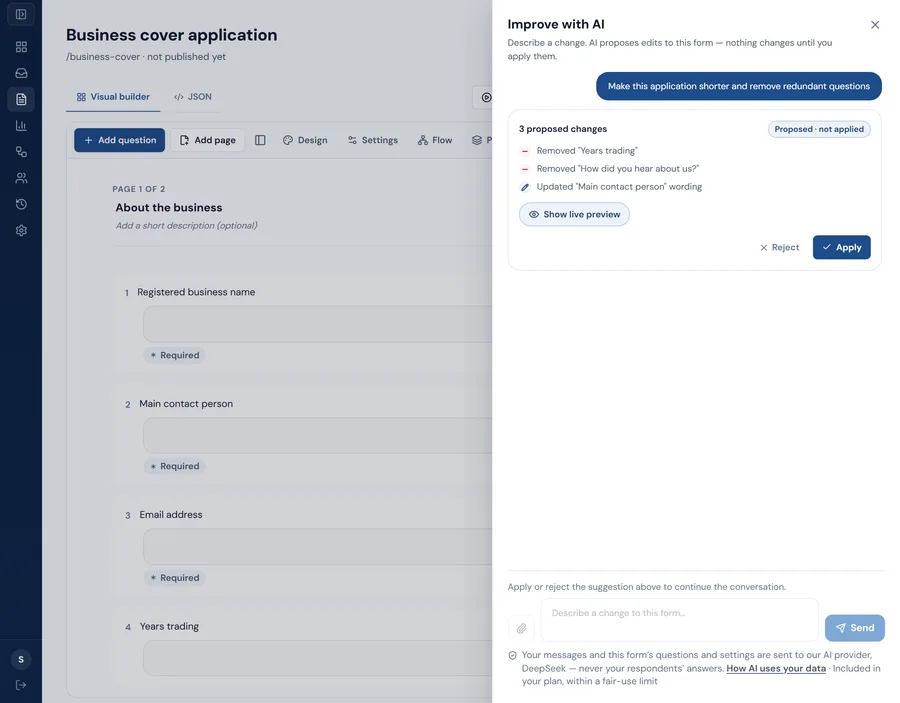
AI that proposes changes. You decide what happens.
Describe what you want in plain language. UndaForms turns it into specific, reviewable changes to your form or workflow — and applies nothing until you choose to.
Draft with AI
- When
- A submission is received
- Then
- 1. Send an email to the operations team
- 2. Add a row to Google Sheets
Illustration of workflow drafting. Drafts use the connections your organization has already set up, and nothing is saved or switched on until you do it in the builder.
Draft a form
Describe the form you need, or upload an existing PDF, and get a structured draft to review in the builder.
Improve it in conversation
Ask for a shorter form, clearer wording or a better structure. Each suggestion lists exactly what would change.
Draft a workflow
Say what should happen after a submission and get a When / Then workflow built from your own forms and connections.
Edit a workflow in conversation
Add a step, change a condition or reorder actions by asking — reviewed before anything is saved.
Audit quality
Instant checks on forms and workflows, with an optional AI review that points to what to fix.
Nothing changes on its own
Suggestions are checked against the same rules as a manual edit. AI cannot publish a form or activate a workflow.
AI form drafting, improvement and quality checks are on every plan. AI for workflows needs workflow automation, on Growth and above. AI requests are rate-limited per organization.